Get Reliable WiFi Off-Grid (5 Best Options)
Living off-grid doesn’t mean living offline — but figuring out how to actually get reliable internet when you’re miles from the nearest cable drop is one of the most common headaches we hear about. Whether you need connectivity for remote work, telehealth, homeschool resources, or just staying in touch, the options have expanded dramatically in the last few years. The trick is matching the right technology to your specific location, budget, and bandwidth needs.
What You’ll Learn
- The four main ways to get internet access off-grid (and which fits your situation)
- How to extend and distribute WiFi across your property once you have a connection
- Real equipment recommendations with expected costs and performance
- How to minimize power draw so your solar system isn’t crushed by your router
Understanding Your Off-Grid Internet Options
Before buying anything, you need to figure out which type of connection is actually available and practical at your location. Here’s the honest breakdown.
Starlink (Satellite Internet)
Off-Grid Insider
Get off-grid guides & gear picks in your inbox — free
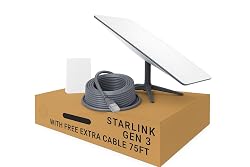
Starlink has changed the game for off-grid internet. Unlike older satellite providers like HughesNet or Viasat that use geostationary satellites (22,000 miles up, terrible latency), Starlink’s low-earth-orbit constellation sits around 340 miles up. That means latency in the 25–60 ms range — usable for video calls, streaming, and even light gaming.
What to expect:
– Download speeds: 25–100 Mbps typical (varies by congestion and location)
– Upload speeds: 5–15 Mbps
– Latency: 25–60 ms
– Power consumption: 40–75W average (the standard dish), 50–85W for the High Performance dish
– Monthly cost: $120/month for residential, $140/month for the roaming plan
– Equipment cost: $499 for the standard kit
The standard Starlink kit includes the dish (called Dishy), a router, cables, and a mounting tripod. You need a clear view of the sky — trees are the number-one problem. Use the Starlink app’s obstruction checker tool before you commit. Even 2–3% obstruction causes noticeable dropouts during video calls.
Power note: At 40–75W continuous draw, Starlink pulls roughly 1–1.8 kWh per day. On a small off-grid solar system (say, 1,000W of panels with 5 kWh of battery storage), that’s significant but manageable. We recommend putting Starlink on a timer or smart plug so it’s not drawing power overnight if you don’t need 24/7 connectivity.
Cellular Data (4G LTE / 5G Fixed Wireless)

If you have any cell signal at your location — even one bar — a cellular setup with an external antenna can deliver surprisingly good internet. This is often cheaper than Starlink and uses less power.
Key components:
– A cellular modem/router (not just a phone hotspot)
– An external directional or omnidirectional antenna
– A data plan
Dedicated cellular routers like the Pepwave MAX BR1 Mini or the GL.iNet Spitz AX are purpose-built for this. They accept external antenna connections (MIMO), handle band locking, and run far cooler and more reliably than a phone acting as a hotspot.
Pair the router with a high-gain external antenna like the Waveform 4×4 MIMO panel antenna mounted on your roof or a pole. Users in off-grid communities regularly report going from 1 bar to full signal, turning a barely-usable 2 Mbps connection into 30–50 Mbps.
Power draw: Most cellular routers pull 5–15W — a fraction of Starlink. This matters if your solar budget is tight.
Data plans: T-Mobile Home Internet ($50/month, truly unlimited in eligible areas) is the gold standard if available. Otherwise, look at AT&T or T-Mobile business/reseller plans. Avoid plans marketed as “unlimited” that actually throttle after 50 GB.
Fixed Wireless ISPs (WISPs)
In many rural areas, small wireless ISPs operate towers that beam internet via microwave or radio signals. You typically need line-of-sight to a tower, and speeds range from 10–100 Mbps depending on the provider.
Search the FCC broadband map (broadbandmap.fcc.gov) for your address, or ask neighbors. WISPs are often the most cost-effective option when available — $50–80/month, low power requirements, and the provider handles the equipment.
Long-Range WiFi Bridge (Borrowing a Neighbor’s Connection)
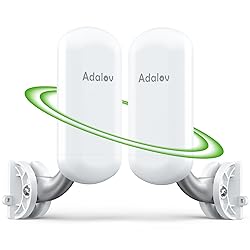
If you have a willing neighbor with internet within a few miles, a point-to-point wireless bridge can extend their connection to your property. Ubiquiti’s NanoStation 5AC Loco units are the standard tool here — a pair costs under $120 and can maintain a stable link over 5+ miles with clear line-of-sight.
Each unit draws about 8W. You’ll need one at each end, both with line-of-sight (or close to it), and your neighbor’s permission and cooperation.
Setting Up Your Off-Grid WiFi Network
Once you have internet coming in, you need to distribute it across your cabin, workshop, garden, or wherever you spend time.
Indoor Coverage

Most off-grid cabins are small enough that the router included with your internet source (Starlink’s router, your cellular router) covers the interior just fine. If you have a larger or multi-building setup, add a simple access point like the TP-Link EAP225 — it draws about 7W, mounts to a ceiling or wall, and delivers solid coverage for around $60.
Outdoor Coverage

Getting WiFi to outbuildings, gardens, or work areas is where most people struggle. Running Ethernet cable is ideal if distances are under 300 feet — use outdoor-rated direct-burial Cat6 cable. For longer distances or where trenching isn’t practical, outdoor access points like the Ubiquiti UniFi AC Mesh handle weather well and cover large areas.
Power Over Ethernet (PoE)
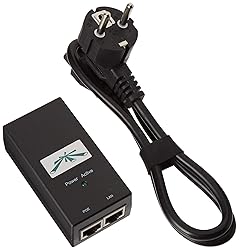
Many outdoor access points and bridges run on PoE, meaning they get power and data through a single Ethernet cable. This simplifies wiring enormously — you don’t need a power outlet at each device, just a PoE injector or PoE switch at your router location.
Managing Power Consumption

Internet equipment can be a silent battery killer. Here’s how to keep consumption in check.
Audit your draw. Plug every network device into a Kill A Watt meter and measure actual consumption. Don’t trust manufacturer specs alone — real-world draw varies with signal conditions and temperature.
Schedule your uptime. If you don’t need 24/7 connectivity, put your internet equipment on a timer. Running Starlink 12 hours a day instead of 24 cuts your consumption in half. A simple 12V timer relay or a WiFi smart plug on an inverter outlet works.
Use 12V/24V native equipment when possible. Many cellular routers and access points can run on 12V DC directly, skipping the inverter entirely. Every time you convert DC battery power to AC and back to DC, you lose 10–15% to inefficiency. A DC-DC converter is far more efficient.
Starlink’s power draw by mode:
– Searching/booting: 75–100W
– Active use: 40–75W (standard dish)
– Idle/sleep: 15–25W (if enabled in settings)
Common Mistakes
Relying on phone hotspots as a primary connection. Phones throttle hotspot data, overheat during extended use, and the internal antennas can’t match an external setup. A dedicated cellular router with an external antenna on the same carrier will outperform a phone hotspot by 3–10x.
Ignoring line-of-sight for satellite dishes. We see people buy Starlink, mount it behind trees, then complain about dropouts. Use the obstruction tool first. If you can’t get clear sky, consider a tall pole mount — 20–30 foot poles are common in off-grid Starlink installations.
Oversizing the system before testing. Don’t buy a $500 antenna setup before confirming you have usable cell signal. Borrow a friend’s phone on different carriers first. Drive to your property, check signal strength on each carrier using apps like CellMapper or OpenSignal, and only then invest in equipment.
Forgetting about weather and temperature. Electronics in uninsulated sheds or attics face extreme temperatures. Most networking equipment is rated to about 104°F (40°C). In hot climates, keep routers and modems in ventilated or conditioned spaces. In cold climates, some equipment (especially Starlink’s dish) uses power to melt snow — budget for that extra draw.
Our Recommendations
Best Overall: Starlink Standard Kit

For most off-grid locations, Starlink is the most reliable path to broadband-speed internet. The $499 upfront cost and $120/month fee are significant, but the performance is unmatched for locations with no cell service. Pair it with a timer to manage power draw, and budget around 1.5 kWh/day for moderate use.
Best Budget Option: Cellular Router + External Antenna

If you have cell signal, a GL.iNet Spitz AX router ($200–300) paired with a Waveform external MIMO antenna ($100–200) and a T-Mobile or AT&T data plan gives you solid internet at a fraction of Starlink’s power draw. Total upfront cost: $300–500. Monthly cost: $50–80. Power draw: 8–15W.
Best for Extending Coverage Across Property: Ubiquiti NanoStation Pair
For getting internet from one building to another — or from a neighbor’s house to yours — a pair of Ubiquiti NanoStation 5AC Loco units ($100–120 for two) provides a rock-solid wireless bridge that works at distances up to several miles. Minimal power draw at about 8W per unit.
FAQ
Can I use regular home WiFi routers off-grid?
Yes, but they’re designed for AC power. You’ll need an inverter running to power them, which wastes energy. Look for routers and access points that accept 12V DC input or run on PoE, so you can power them more efficiently from a battery system.
How much solar do I need just for internet?
For a Starlink setup running 16 hours/day, budget around 200–300W of solar panel capacity and 2–3 kWh of battery storage dedicated to internet. For a cellular router setup, 50–100W of panels and 0.5 kWh of battery is plenty. These numbers assume you’re also powering other loads — don’t size your entire system just for internet.
Is Starlink worth it if I only have partial sky view?
If the Starlink app shows more than about 2% obstruction, you’ll get frequent dropouts — fine for browsing and email, frustrating for video calls and streaming. Consider a taller mount or clearing some branches before committing. Anything above 5% obstruction typically makes the service unreliable for real-time applications.
Can I use a mesh WiFi system off-grid?
You can, but most consumer mesh systems (Eero, Google Nest WiFi) draw 6–12W per node, require AC power at each node, and assume short distances between nodes. For off-grid properties where you need coverage across outbuildings, dedicated outdoor access points or point-to-point bridges are more power-efficient and reliable.
What about older satellite internet like HughesNet or Viasat?
They still exist and technically work, but the experience is poor by modern standards — 600+ ms latency makes video calls nearly impossible, data caps are strict (15–150 GB/month), and speeds rarely exceed 25 Mbps. With Starlink available in most areas and cellular options improving, we’d only consider legacy satellite as an absolute last resort.