5 Best Starlink Alternatives 2026
If you live outside the reach of cable and fiber, you’ve probably been told Starlink is your only real option. But between equipment costs north of $500, inconsistent speeds during peak hours, and waitlists that stretch for months in some areas, plenty of rural households are looking for a reliable alternative. The good news: there are legitimate options — cellular routers, fixed wireless gear, and competing satellite hardware — that can deliver usable internet without the Starlink price tag or the wait.
Our top pick: GL.iNet GL-X3000 Spitz AX — best overall 5G cellular router for rural homes.
Best budget: MOFI4500-4GXeLTE — proven 4G LTE workhorse under $300.
Best for off-grid setups: Peplink MAX BR1 Pro 5G — dual-SIM failover built for remote deployments.
Our Picks
GL.iNet GL-X3000 Spitz AX
The Spitz AX is the best starlink alternative for rural households that have any usable 5G or LTE signal. It combines a Wi-Fi 6 router with a built-in 5G NR modem, dual SIM slots, and an external antenna connector — all in one box that sits on your shelf instead of requiring a roof-mounted dish.
Who it’s for: Rural homeowners with at least one bar of T-Mobile or AT&T 5G/LTE who want a plug-and-play cellular internet solution.
Pros:
– Dual-SIM support lets you failover between carriers automatically — critical when one tower goes down
– External antenna ports (2x SMA) pair with aftermarket antennas to dramatically boost signal in weak-coverage areas
– OpenWrt-based firmware gives advanced users full control over VPN, DNS, and traffic routing
Cons:
– 5G performance is entirely dependent on your local tower distance and congestion — no tower, no internet
– The included antennas are basic; most rural users will need to budget another $50–$150 for a proper external MIMO panel antenna
MOFI4500-4GXeLTE
Off-Grid Insider
Get off-grid guides & gear picks in your inbox — free
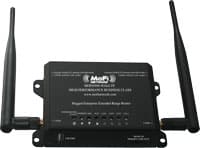
The MOFI4500 has been a quiet favorite in the rural internet community for years, and for good reason. It is a dedicated 4G LTE router with rock-solid reliability, external antenna ports, and a price point that undercuts most competitors by a wide margin.
Who it’s for: Budget-conscious rural users on 4G LTE coverage who want proven hardware without paying for 5G capability they can’t use.
Pros:
– Band-locking lets you manually select the strongest tower and frequency — a game-changer in areas with congested nearby towers
– Four external antenna connectors support full 4×4 MIMO setups for maximum signal capture
– Active community forums with years of real-world configuration advice for nearly every rural scenario
Cons:
– No 5G support — if your area gets 5G tower buildout, you will eventually want to upgrade
– The web interface looks like it was designed in 2008, though it is functional once you learn the layout
Peplink MAX BR1 Pro 5G
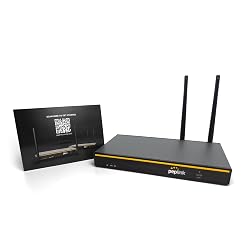
Peplink makes the gear that fleet operators and disaster-response teams rely on, and the BR1 Pro 5G brings that same reliability to your off-grid cabin. Dual-SIM with intelligent failover, GPS tracking, and industrial-grade build quality make this the choice when downtime is not acceptable.
Who it’s for: Off-grid homesteaders, remote workers, and anyone running critical systems (security cameras, medical devices, remote monitoring) who need internet that does not drop.
Pros:
– SpeedFusion bonding can combine two cellular connections into one tunnel for both speed and redundancy
– Designed for 24/7 unattended operation in temperature extremes — rated for -40°F to 149°F
– Remote management via Peplink’s InControl 2 cloud dashboard, so you can troubleshoot from anywhere
Cons:
– Expensive — typically $700–$900 for the unit alone, before adding antenna and data plan
– Overkill for a household that just wants to stream Netflix and check email
Netgear Nighthawk M6 Pro
The Nighthawk M6 Pro is a portable 5G hotspot that can double as a home internet gateway when paired with an external antenna and Ethernet adapter. It gives you flexibility that a fixed router cannot — take it to town when you need speed, bring it home and plug it in for household use.
Who it’s for: Rural users who split time between a homestead and other locations, or who want a single device for both mobile and home internet.
Pros:
– Wi-Fi 6E support with up to 32 connected devices — enough for a full household
– Built-in touchscreen displays signal strength, data usage, and connected devices at a glance
– USB-C Ethernet adapter support turns it into a wired connection for desktop PCs and mesh systems
Cons:
– Battery life is roughly 6–8 hours under load; for continuous home use, it needs to stay plugged in permanently
– Carrier-locked models (AT&T or T-Mobile) limit your flexibility — unlocked models cost more but are worth the premium
Ubiquiti LiteBeam 5AC Gen2

If you have a neighbor, community center, or local business within a few miles that has decent internet, a point-to-point wireless bridge can share that connection to your property at near-wired speeds. The Ubiquiti LiteBeam 5AC Gen2 is the standard tool for this job — used by WISPs (wireless internet service providers) across rural America.
Who it’s for: Rural property owners who have a willing neighbor or local WISP within line-of-sight distance (up to ~15 miles with clear terrain).
Pros:
– Capable of 450+ Mbps throughput over multi-mile distances with clear line of sight
– Extremely affordable at around $50–$60 per unit (you need two — one at each end)
– Low power draw makes it feasible for solar-powered installations
Cons:
– Requires clear line of sight between endpoints — trees, hills, or buildings in the path will kill performance
– Setup requires basic networking knowledge and a laptop for initial configuration; this is not a consumer plug-and-play device
Waveform 4×4 MIMO Outdoor Panel Antenna
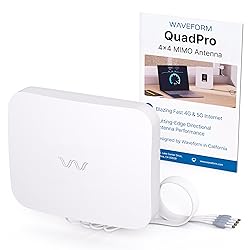
This is not a standalone internet solution — it is the force multiplier that makes any of the cellular routers above actually work in rural dead zones. The Waveform panel antenna is the most consistently recommended external antenna in the rural internet community, and for good reason.
Who it’s for: Anyone using a cellular router (GL.iNet, MOFI, Peplink, or Nighthawk) in a weak-signal area who wants to maximize their connection before giving up on cellular.
Pros:
– 4×4 MIMO design captures more signal than cheaper 2×2 antennas — verified buyer reports show 10–20 dB signal improvement in typical rural setups
– Broadband frequency support covers all major 4G LTE and 5G NR bands across T-Mobile, AT&T, and Verizon
– Mounting hardware included for pole, wall, or roof installation
Cons:
– At $200+, it is a significant add-on cost to your router investment
– Requires running outdoor-rated cables from roof/pole to your indoor router — plan for a proper weatherproof installation
How We Chose
We started with every product that consistently appears in rural internet forums — Reddit’s r/Rural_Internet, the MOFI community boards, the Peplink forums, and the LTE Hacks Facebook group — and filtered for devices with at least 100 verified buyer ratings on Amazon and a pattern of positive real-world reports from users in low-signal environments. We cross-referenced manufacturer specs against reported performance at distances beyond 5 miles from the nearest tower. We excluded any device that lacked external antenna ports, because in truly rural areas, the stock antennas on any indoor device are rarely sufficient. We also excluded satellite services like Viasat and HughesNet from this list — while they technically serve rural areas, their latency (600ms+) and data caps make them poor alternatives to Starlink rather than genuine upgrades.
Buying Guide
Signal Availability Is Everything
Before you spend a dollar on hardware, check your actual cellular signal. Download the OpenSignal or CellMapper app, walk your property, and note which carriers have towers within range. A $900 Peplink router will not help you if the nearest tower is 25 miles away behind a mountain. T-Mobile’s 5G home internet coverage map and AT&T’s fixed wireless availability checker are worth consulting, but on-the-ground testing with a phone always tells the real story.
External Antenna Compatibility

For most rural properties, the single biggest performance upgrade is an external MIMO antenna mounted on a pole or rooftop. Make sure whatever router you buy has external antenna ports — specifically SMA or TS-9 connectors. Devices without external antenna ports (like most consumer hotspots) are limited to what the internal antenna can capture, which is usually not enough when the tower is miles away.
Data Plan Realities
The hardware is the easy part. Finding a cellular data plan that gives you enough data for household use is the harder challenge. T-Mobile Home Internet (if available at your address) offers truly unlimited data at $50/month. Otherwise, you are looking at business plans through AT&T or Verizon, or reseller plans through companies like Calyx Institute. Budget at least $50–$100/month for data on top of your hardware cost, and read the fine print on deprioritization thresholds.
Dual-SIM and Failover

In rural areas, tower outages are not rare events — they are routine. A router with dual SIM slots lets you keep two carriers active so that when one goes down, the other picks up automatically. This is not a luxury feature for rural internet; it is close to a necessity. The GL.iNet Spitz AX and Peplink BR1 Pro both support this natively.
FAQ
What is the best Starlink alternative for rural areas with no cell signal?
If you have zero cellular signal even with an external antenna, your realistic options narrow to point-to-point wireless (if a neighbor within line of sight has internet) or a competing LEO satellite service. Amazon’s Project Kuiper is expected to begin consumer service in late 2026, and OneWeb provides coverage in some regions through resellers. For now, a high-gain directional antenna paired with a cellular router is worth testing before concluding you have no signal — many users are surprised by what a roof-mounted MIMO panel can pull in.
How much does rural internet cost without Starlink?
A cellular router setup typically costs $200–$900 for hardware plus $50–$100/month for a data plan. A point-to-point wireless bridge costs around $120 for a pair of Ubiquiti units plus whatever arrangement you make with the neighbor sharing their connection. Compare that to Starlink’s $599 hardware fee and $120/month service cost — cellular setups often end up cheaper in the first year.
Can I use T-Mobile Home Internet instead of Starlink in a rural area?
Yes, if T-Mobile’s coverage map shows your address as eligible. T-Mobile Home Internet delivers 33–245 Mbps in our review of reported speeds, costs $50/month with no data cap, and requires no contract. The catch: availability is limited, and T-Mobile may not offer it at rural addresses even if you have cell signal. Check their website first — if your address qualifies, it is the simplest and cheapest Starlink alternative available.
Do cellular routers work in rural areas without 5G coverage?
Absolutely. 4G LTE routers like the MOFI4500 deliver 25–100 Mbps in real-world rural conditions with a good external antenna. You do not need 5G for usable rural internet — many rural towers still run primarily on 4G LTE bands, and they will for years. Buy for the coverage you have now, not the coverage you hope to have later.
What external antenna do I need for a rural cellular router?
A 4×4 MIMO outdoor panel antenna (like the Waveform panel) is the standard recommendation for rural fixed installations. Mount it as high as possible with a clear path toward your nearest cell tower. Use CellMapper to identify tower locations, then aim accordingly. For most setups under 10 miles from a tower, a panel antenna will provide a usable connection; beyond 10 miles, you may need a higher-gain directional Yagi-style antenna.
The Verdict
For most rural households looking for the best Starlink alternative, the GL.iNet GL-X3000 Spitz AX paired with a Waveform 4×4 MIMO panel antenna is where we’d start. It covers 5G and LTE, supports dual SIMs for carrier failover, and gives you the external antenna ports that actually make cellular work in low-signal areas. If budget is tight, the MOFI4500-4GXeLTE remains a proven choice that has kept rural households online for years. Either way, test your signal first, invest in a proper external antenna, and skip the $599 dish.